Showing posts with label blog. Show all posts

Wednesday, June 17, 2015

Let's talk... I want to get to know you!

I think we need to talk...

bay leaves

I'm not breaking up with you, no, it's not you, it's me.. This blog has been around, in one form or another, for 7 years now. I've become really proud of my little space on the internet, particularly in the last couple of years, it's become something I really love. However, recently, my heart just hasn't been in it. I've really wanted to blog! But, I have a new job, which is mostly spent in front of a computer. The last thing I want to do when I do some evenings, after I've dragged my butt to the gym, had dinner and made my lunch for work - is to fire up my laptop and do, what sort of feels like work at the moment. I know it won't always, and I just need to get into a routine, but I used to do shifts and I was on my feet more - which means the gym and my healthy eating needs to be more of a priority, or it slips. Some nights and most weekends, I want to socialise, too (shock horror). 

Anyway, the last few weeks - I noticed my follower count dropped marginally - and this concerned me. I found this weird as I've never really cared about my follower count - it was something I was aware of but never put much weight in - as I've always just blogged for me, about me, about my life, and rambled on in my own little way. However I noticed this number dropping and it bothered me and I couldn't work out why - and I think at this point I realised that I didn't know who you are, my readers! I often see similar faces in my comments as I do on Twitter, I try and reply to all my comments (although I've been shit at this recently!) and I do read a lot of your blogs regularly, however I really want to know you all better!

So I've come up with a little survey - and I'd love it if you took the time to fill this in! You can leave it in the comments (or fill it out on your blog if you have one, and link it in the comments!) because it would be amazing to find out more about you lovely people. 
1. Your name, age, country, if you feel like sharing. :)
2. What is your most recent purchase?

3. What is your favourite book and why?

4. On a Saturday morning, where are you and what are you doing?

5. What TV show are you currently binge-watching or what book are you currently reading?

6. Do you prefer to be controversial or liked-by-everyone?

7. Are you more introverted or extroverted?

8. What was your first job?

9. What is your favourite painting?

10. Leave links to where I can find more about you (your blog/twitter/instagram, etc).
And here are my answers - so incase you didn't know about me, here are a few little insights...
1. My name is Clare, I'm 25 (first time I've written that since my birthday, oh god I feel old!), and I live in Hampshire in the UK.
2. My most recent purchase was a fancy lunch out for my parents 30th wedding anniversary - and 2 blouses from the Topshop website, somewhat sleepily, last night.
3. Until recently I would have said The Bell Jar by Sylvia Plath, but The Goldfinch by Donna Tartt comes in a very very close second.
4. Recently I've been all over the place, from spending time in London, but more regularly I'm probably having a lie in, doing some shopping, or catching up with my friend Gemma.
5. I'm about to start on the second series of Orange is the New Black - and I've just finished re-reading the Harry Potter books.
6. Liked by everyone. I am too worried what about what people think to be controversial!
7. I'm somewhere in between, but definitely more introverted than the opposite - I much prefer to just chill in bed with a book or put a film on than go outside and be sociable.
8. My first job was at Waitrose, being a Sunday deli-girl.
9. My favourite paintings are a series by Mark Rothko called the Seagram murals, in particular this one which is called Red on Maroon. A lot of people think they're very overrated or cliche, but I like them for some personal reasons.
So there we go! I'd love it if you took part.. :)   

Monday, February 09, 2015

how to create and use an editorial calendar

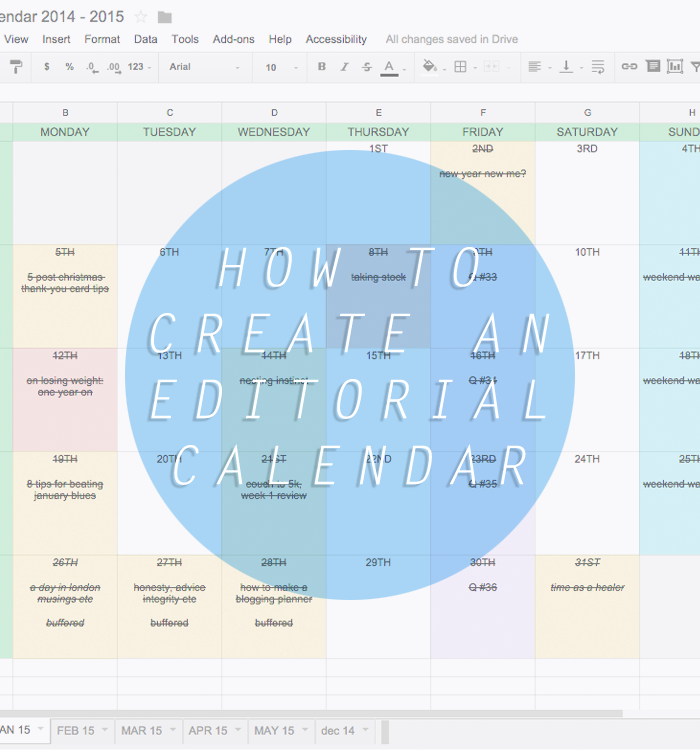
how to create an editorial calendar

I've wanted to talk about how to create an editorial calendar for blogging for the longest time, because it's really changed how I plan blog posts, how I schedule content and keep myself organised in general. 
I mentioned last week how I love to use a little handwritten planner to keep track of things I want to do, ideas that spring to mind, or content that I need to write, and I do really love that method for the creative side of things. However, once the copy is written, photos are taken, and posts are are ready to be published, I like to bring my up editorial calendar to have a look at when I'll post. 

There are so many ways out there to create an editorial calendar, from traditional diaries, printables, and even apps like CoSchedule, but I prefer this method, which I had sort of attempted doing before I found the lovely Gillian' tutorial over at Elevator Musik for how to set this up properly and a lot of this post is inspired by hers, so please go check it out, it's all much prettier than mine! I've been using this for blogging since May 2014, and it's been so brilliant! The amount of posts I wrote in 2014 tripled from 2013, and I think this is in part to getting organised. Some of this organisation may seem like over-kill for something that is a hobby of mine, but I enjoy getting myself organised!


GET YOUR SPREADSHEET SET UP
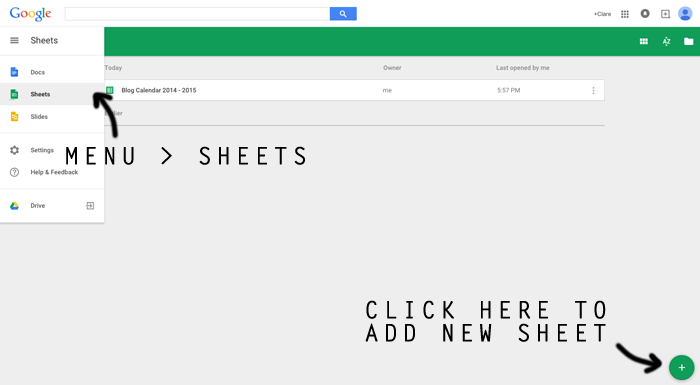
You can use any format you like, obviously, but I love to use my Google Drive for my calendar, as it's accessible from anywhere, saves automatically, and is just really easy to bring up when I'm blogging, as I have it bookmarked on my toolbar. Go to your Google Docs, and from the drop down menu at the side, select Sheets, then press the green cross in the bottom corner to bring up a new spreadsheet - it's pretty much as easy as that. Name it something obvious, that you can find, like Blog Calendar 2015, then you're ready...
how to create an editorial calendar 1


MAKE IT LOOK PRETTY
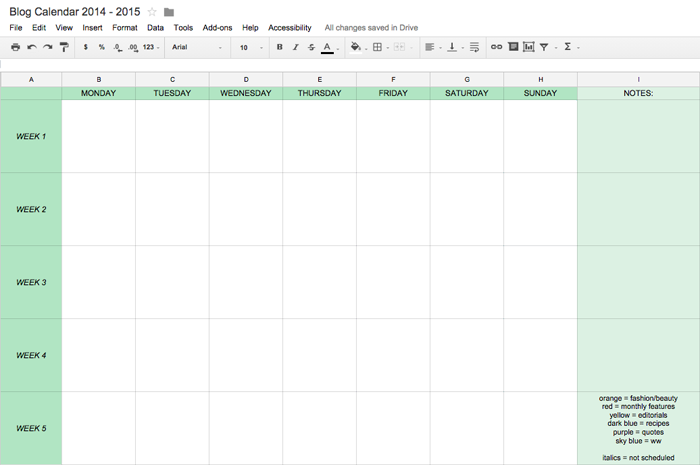
This is the fun bit, you can make this look like whatever you like. I copied Gillian's format for this, in having the days across the top, and then Week 1-5 down the left hand side. I made it match my blog colours/font, cause I'm ridiculous like that, simply put. You can make all your cells the same size, highlight all the columns/rows you want, then right click and select Resize columns, and enter a defined value for them. You can use the colour picker to select a colour that suits your blog, and make the font match and all sorts.
At the bottom (which I annoyingly cut off in these images, but you can see in my main image, at the top of the post) you can see that I created tabs for each month, and I fill in the dates manually using the calendar on my phone or laptop. 
how to create an editorial calendar 2


FIGURE OUT A SYSTEM YOU'LL USE
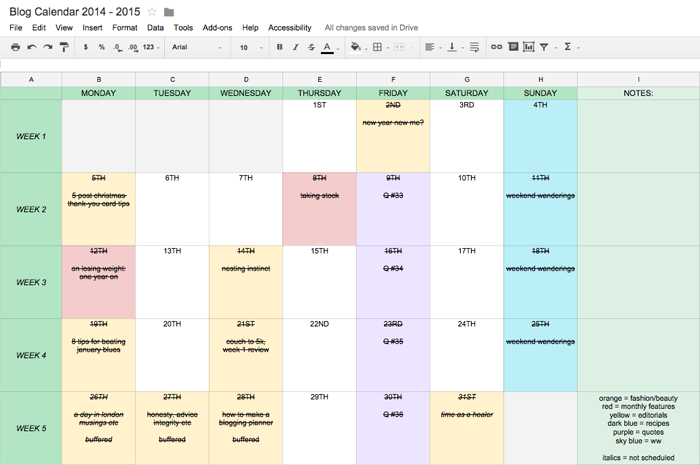
Like with my blog planner, it takes using the calendar to find out how to make it work for you. I set myself up with a key, using different coloured highlighted squares to figure out how to plan my content. For example, you can see that his month I didn't post any recipes because I was posting other kind of content that I enjoyed writing, so it's all sort of swings and roundabouts. I have regular features on Friday and Sunday, so I fill those columns in ahead of time, as I know that they'll be frequent features. You can see that the beginning of January was a bit all over the place, because I was getting back into the swing of things, post-Christmas, but it really does help me stick to my posting schedule. When I've scheduled a post, I strikethrough the whole box, and it makes me like I've accomplished something! 
how to create an editorial calendar 3

SOME EXTRA TIPS:
  • I like to be able to see the last month, to compare the kind of content I've posted, but anything before that clutters up my workspace. Right click on the old page tab at the bottom of the page and select hide sheet. To view the sheet again, select View > View Hidden Sheets... From the toolbar, and you'll have access to them all again.
  • I used the Notes column more frequently untilI set up my blog planner, but I like to still have there, just in case I need to add comments or reminders to myself, and I haven't got my planner to hand.
  • I've recently started adding the 'buffered' comment to my calendar, to remind me that I need to scheduled tweets for that post, also. 
  • I use italics to add in posts that I write, that are 'last minute' additions. They're ones that I haven't planned on posting necessarily, they're written then and there and published on the spot. 
  • I highlight boxes bright red, as opposed to their corresponding colour, if I know I haven't yet completed everything for that certain post, and it reminds me that the post needs something doing for it!
  • I like to stay about one-week ahead of schedule, so I have some time to write some posts if I feel like I'm short on content that week. You can see that like 95% of my content is scheduled, and I know from recent Twitter chats that some people have a problem with that, but I don't see how it make a damn bit of difference! haha
And there we go, hopefully this helps a little bit! There are hundreds of ways out there to make an editorial calendar work for you, though - if this doesn't float your boat, try looking on Pinterest for inspiration, or turn your hand to making your own. 
Do you use an editorial calendar? Share how it helps you in the comments below, I love finding out new things! 

Wednesday, January 28, 2015

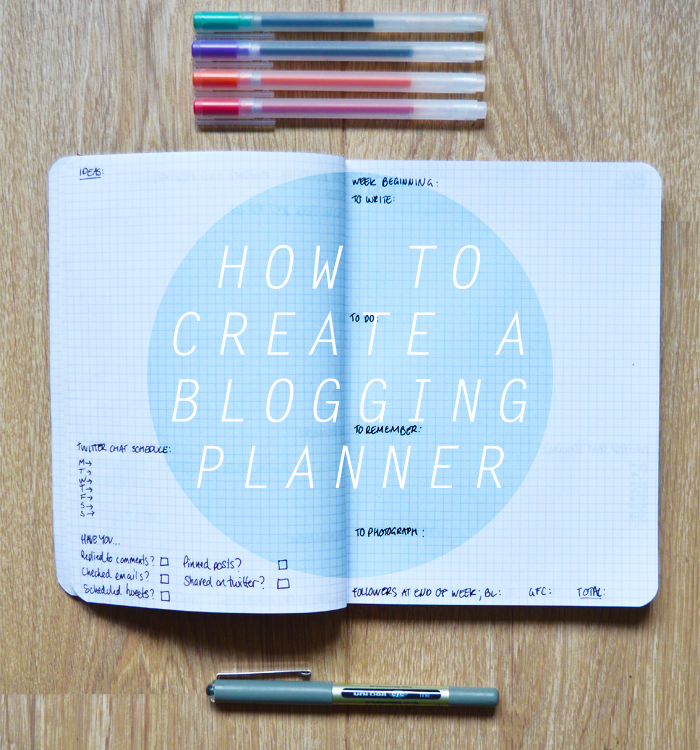
how to: make a blogging planner

how to make a blogging planner

I've been trying really hard to keep my blog organised this year, it was one of my goals for the year, to try and keep up with my blog whilst working and looking for new jobs. It's hard to keep everything organised and ticking over, and I was always making lists that I would lose or accidentally delete on my phone... Fed up of this, I looked into blogging planners, and all sorts of things, before deciding to make one of my own.

For this, all you need is a notebook (I like a squared one), a black pen and a coloured pen (or several, if that helps motivate and organise you!). It's really that easy and simple! I like to use a plain notebook, because this way I can adjust it to suit my needs and I'm not constricted by other peoples design. It does take a wee bit of configuring, to find what sections you'll use most, and what you don't. I've been trialling this for a few weeks, and I've found these headings the most useful for me, but you may want to play around with it for a bit until you find the right system that really works for you. 
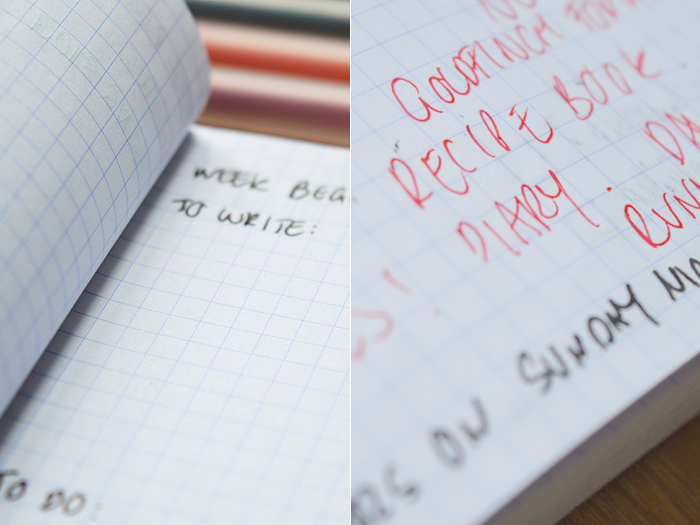
TO WRITE: These are blog-posts that I need to write for that week or the coming week. When I've finished them, I cross them through, or I highlight them to make a note of overdue post. I also make a note here if for example, I've written and note scheduled it, or it needs photos to be put into the post, etc.

TO DO:
These are things that I need to get done, which might not be writing blog posts, etc, maybe it's replying to a certain email, finding an image for a post, editing some photographs or images, or updating an on-going series post... Just little things that I need to get done, that have a deadline on them.

TO REMEMBER:
These are tasks that are important, but not imminent. It might be that I need to check when one my advert campaigns ends, or to take part in a twitter chat, follow up links from a chat, or to schedule something for in the future. Like the to do section, but less time sensitive.

TO PHOTOGRAPH:
This tab is pretty self-explanatory, but it helps, particularly in the winter when light is a precious commodity. If I need to photograph something, I can make sure I get ready to take the photographs the day before, and won't have to faff about and wonder what else I need to get photographed! 
You could make this a daily system, but I don't have that much to do in a day, so I make it for the week, writing the date for a Monday at the top of the page. At the bottom of this page, I also make a note for Sunday night, to check my followers on Bloglovin'/GFC, and a total, so I can see if I gained a certain amount of followers that week, whether it was due to a certain post, or chat, etc... It's just helps to keep me motivated, I find.

On the opposite page, I use a few different headings that I'm still sort of configuring...
IDEAS: A little vague, but obvious at the same time - this is where I brainstorm and make notes of future blog posts, it might be a title or it might be a list, or a sentence, or just a word, it's just some space for me to jot down ideas when they come to me (this is usually whilst I'm writing other blogposts, so it's good to have this to hand). 
TWITTER CHAT SCHEDULES: For the longest time I was awful at forgetting when all the chats were, despite very helpful people taking the time to make blog-posts scheduling them all! I've taken to writing down the times and days of the chats that I actively take part it (mainly, #bdib and #lbloggers, but #healthyselves sometimes, I always forget about #fdbloggers). I like to tick them off when I've participated, to keep a track of when I can make it or not.
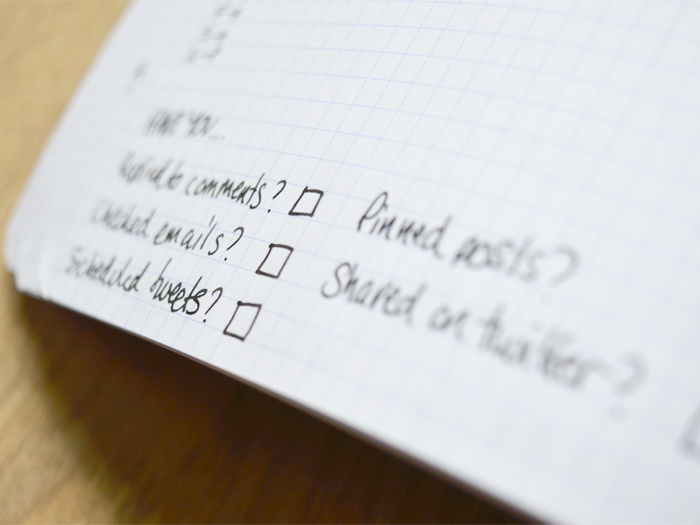
HAVE YOU...: This is to remind me to do all the blog admin that I need to do, basically! I'm shit at remembering stuff, plain and simply. My friends will know how rubbish I am at replying to texts, and blog admin is no exception. I think I'll adjust this in the future depending on how much use I find it, but I have a few main things to check off; Replied to comments, checked emails, scheduled tweets (the bane of my life, I always forget!), pinned posts (likewise!), shared on twitter. 
Have you tried a blogging planner, or have any tips on how to use one? I've found it's really motivated me in terms of planning posts and checking off lists. For example on Sunday, I knew I had a lot of things to photograph for future posts, so I made a small list of what things I need to photograph, for what posts, and blasted through all those pictures in about an hour! I'm finding it really useful, and hopefully I'll keep using it.

How do you keep organised on your blog?!

how to make a blogging planner

Monday, May 19, 2014

sponsor uncia and tigris!


Over the last few months, I have been trying to make my blog into something I really love, and I think I have finally got there. A little while ago I changed all the colours and the links on my blog, but yesterday I had a fiddle about with my logo and came across something I really loved, and I thought I would show it off to you and encourage you to have a little look and see what you think.

I'd also like to take the opportunity to talk about something I am trialling on my blog - sponsorships! I thought I would give this ago, and see if there is any interest in it.
The ads are run through Passionfruit, which I have heard good things about, are very cheaply priced as I am not a huge blog, but I know there are lots of smaller craft, knitting, beauty and such blogs that might like a little bit more exposure - thought it would be nice to give smaller blogs, like mine, a chance! 
Pretty much any blogs, websites or businesses (yarn or etsy shops too!) are welcome, as long as they fit in line with what my blog is about, so please check out my Sponorship page and don't hesitate to email me with any questions! 

Monday, September 09, 2013

of dogs and blogs

The longer readers may have noticed a real shift in content recently on my blog... and I have to say that I am really enjoying this new lease of life for Uncia and Tigris. Specifically, less make-up, beauty, fashion, etc, and a shift towards more outdoorsy photos, recipes and home things, as well as knitting. For a while, I kept trying to blog about makeup and stuff, because that is what my blog has always been about, but realised that my heart just wasn't in it anymore. In my last few months of uni I took a break from blogging, and it really helped me realise that I want to blog, and blog about things that I'm really interested in - not whatever is fashionable or current in the makeup world, etc.. I know this might not be what a lot of people are interested in, but I know it's what will keep me happiest in the long run! 
So I don't want to alienate any old readers, I'm sure I'll still update you on fancy new nail-varnish and lipstick from now and then, but theres going to be a bit more variety in my blog..

Just had a little note to say about knitting posts - it is something that I really love and have been shy of sharing with people, for thinking it was uncool or something.. a little while ago I started telling more people about it and have only had good things in response. So if you think it's bad or lame or something, this definitely isn't the place for you! Because lets face it, if you DONT' like something that enables you to make cute little jumpers for adorable dogs then.. well you don't have a heart, haha. 
UA-21892945-2